
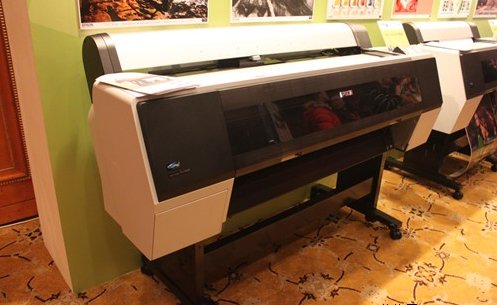
A large-format color inkjet printer is both a sophisticated mechanical device and a complex electronic device, equivalent to both a mechanical plotter and a high-end computer. Its internal structure includes a precision print head, so it is necessary to
avoid mechanical collisions and vibrations, as well as exposure to dust in the air.
Complex electronic components such as CPU, memory, and hard disk are not only extremely sensitive to static electricity but also need to be protected from contact
with humid air. In addition, the user’s operating methods and basic maintenance
during use are also factors that determine whether a large-format color inkjet printer
can work normally and be used for a long time. Here are some suggestions for users’ reference.
- Keep the large-format color inkjet printer in optimal working condition
A large-format color inkjet printer is a relatively expensive precision instrument. To enable it to print exquisite large-format color images, it must work in the best condition. An important condition for keeping it in the best printing state for a long time is to operate in accordance with regulations and maintain it diligently. Although the operation method of a large-format color inkjet printer is not complicated, users still need to develop the habit of strictly following the instructions to complete the entire operation, especially the correct habit of turning on and off the machine. For users, turning the printer on and off is the simplest operation, but it is also the most important maintenance measure. There are many control buttons on the printer panel, as well as a power switch. The power switch is not directly connected to the external power supply, but controls the external power supply through its own relevant controls.
Every time the printer is turned on or off, it performs system initialization. This initialization work includes the positioning and resetting of the print head and printing paper, checking whether the top cover of the printer panel is closed, filling the ink cartridge nozzles with ink, and automatically cleaning the print head. When the printer
is turned on through the power switch on the printer, the system can correctly position the print head and printing paper after initialization. When the printer is turned off, the system will automatically reset the print head and printing paper after initialization. This not only ensures the normal operation of the printer, reduces the failure rate, eliminates potential faults, and prolongs the service life of the printer, but also reduces the cost of printing consumables and equipment maintenance, and greatly improves work efficiency. If the user forcibly unplugs the power plug to turn off the printer while it is powered on, the print head cannot be reset, the top cover cannot be closed, and it is easy to cause a print head positioning failure. It should be noted that large-format color inkjet printers have a large frame, light weight, and rollers, making them highly mobile. When plugging in the power cord, it must be placed in a place that is not easy to be touched to avoid accidental power disconnection and abnormal shutdown.
-
Provide a good working environment
Thousands of tiny nozzles are distributed on the wide nozzle of a large-format color inkjet printer. These nozzles directly face the printing paper during printing and are exposed when not in use. Since the aperture of the nozzles is equivalent to the dust floating in the air, if the printer works in a poor environment with a lot of dust, the tiny nozzles are easily polluted and blocked by dust. If the indoor humidity is too high, not only the expensive basic mechanical parts of the printer are prone to rust, but even the nozzles are hard to avoid rusting. The temperature variation range of the printer’s working environment should not be too large. This is because large-format color inkjet printers not only contain a large number of metal parts but also a large number of engineering plastic parts, and the nozzle aperture is very small. If the ambient temperature changes too quickly, the thermal expansion of the parts will cause excessive wear of mechanical parts, and the change in the nozzle aperture will also affect the printing quality. -
Maintenance of the print head
The print head is most likely to have blocked nozzles due to excessive printing time, improper use of ink, or long-term inactivity. Of course, using poor-quality ink cartridges can also cause nozzle blockage, affecting print quality, and in severe cases, even leading to the scrapping of the entire print head. However, in the application of large-format color inkjet printers, since the printing time is generally long, it is inevitable to encounter nozzle blockage. When encountering such problems, we must deal with them as early as possible, and must not cause unnecessary losses by ignoring minor issues. Although the manufacturing process of the print head is sophisticated, its structure is not complicated. The plane in direct contact with the printing medium is covered with many tiny circular holes. The nozzles are connected to the nozzles inserted into the ink cartridge. From the nozzles to the nozzles and around the nozzles, there are often ink powder or impurities with strong adhesion due to drying. As long as these ink powder and impurities are removed, the print head can resume normal printing function.
Most print heads that seem to have been scrapped are only temporarily unable to
work due to blocked nozzles. To restore their printing function, simple flushing methods can be used. For minor blockages such as normal printing but missing strokes or colors, or blurred images at high resolution, the nozzle cleaning program built into the printer can generally solve the problem. This is also a method that staff need to use frequently and should pay attention to. That is, when minor nozzle blockages such as missing strokes or poor colors are found, the cleaning program should be used to clean them
as early as possible, which is the simplest and best maintenance method.
For situations where the machine frequently fills ink or cleans the nozzles during
printing, but the printing effect is still poor, or the print head nozzles are severely blocked, the machine cannot fill ink, or the printer refuses to work, manual cleaning
is required. Although the manual cleaning method is not complicated, it involves disassembling the nozzle, so the number of cleanings should not be too many or
too frequent. The manual cleaning method uses tools such as a syringe, a section of rubber tube that can be slip over the needle, cleaning fluid (such as bottled pure water), a magnifying glass with about ten times magnification, and a hard plastic knife. After removing the print carriage, use a magnifying glass to carefully find the blocked nozzle, slip one end of the rubber tube over the nozzle of the blocked nozzle, then use a syringe to inject cleaning fluid into the nozzle, and if necessary, use a hard plastic knife to scrape off the residues around the nozzle. Be careful not to contaminate the electrode part during use.